













SearchPilot: what takes nine steps in Purview is one search here
How compliance teams find files and emails across the organization in seconds, with the KQL query always in view.
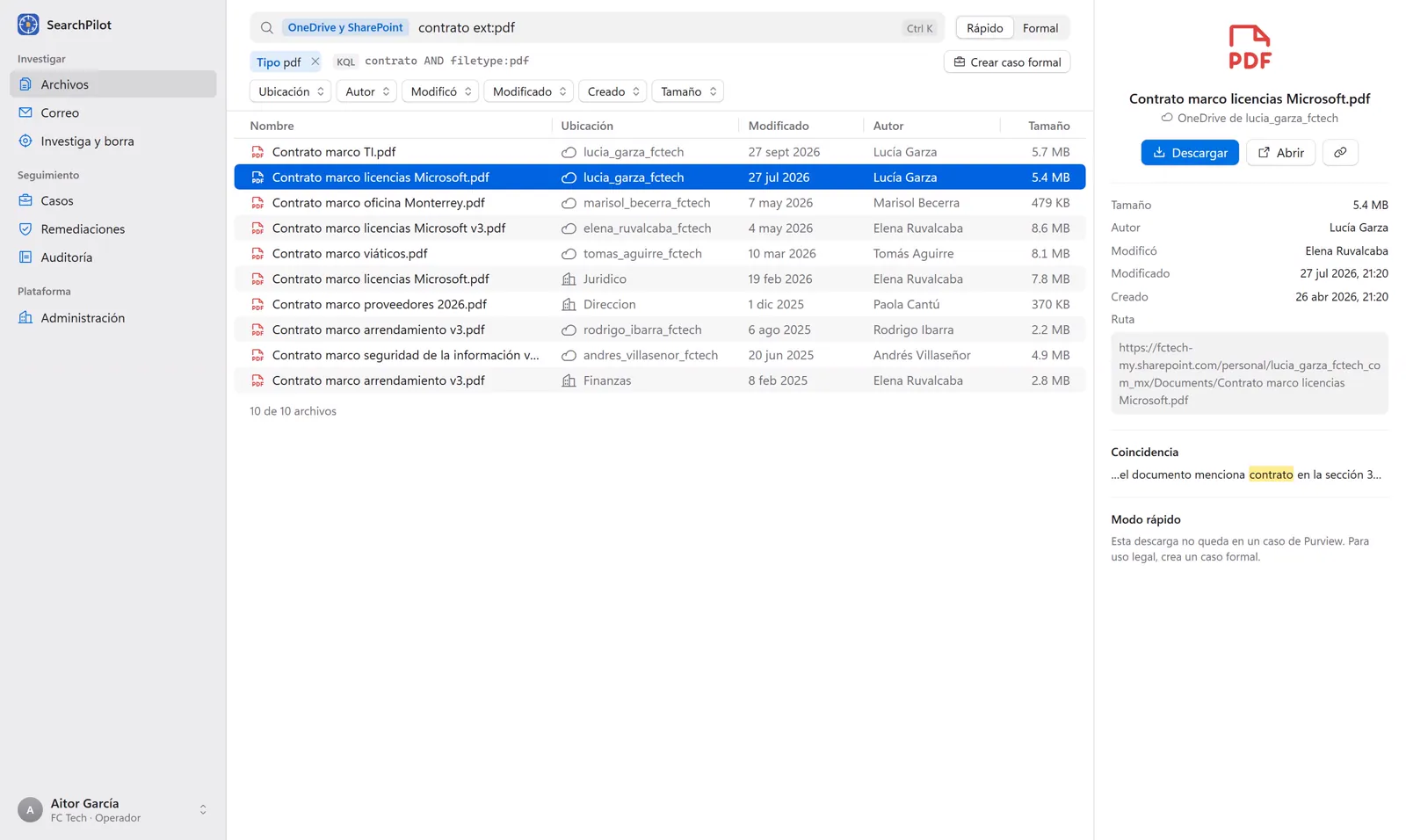
Compliance administrators get the same request over and over: "I need this file today." In the Microsoft Purview portal, that means creating a case, adding members, building the search, choosing locations, writing KQL, waiting for the estimate, reviewing, exporting and unzipping the package.
SearchPilot turns those nine steps into one search.
Search the way you search anywhere else
Type what you need and refine it with filters for location, author, modified by, dates and size. Results from every OneDrive, SharePoint site and mailbox arrive in seconds, and you download them with one click. The actual KQL query always stays visible for auditing.
Quick or Formal, depending on what you need
Quick mode is for finding things. When a finding needs legal standing, the same search becomes a formal eDiscovery case with chain of custody, without leaving the screen.
Remove a phishing email from every mailbox
Enter the sender or subject, see who received it and remove it from every mailbox at once, with a required reason, written confirmation and an undo option.
Security and control
- Sign-in with Entra ID and MFA.
- Each organization isolated and verified on every request.
- Per-organization audit log, exportable to CSV.
- Secrets stored in Azure Key Vault.
We will show it live at Microsoft Frontier Tour Mexico City on October 29.