













ZTNA vs. traditional VPN: why Zero Trust access protects better
A VPN connects people to the whole network. ZTNA connects them only to the app they need, after checking who they are, which device they use and how risky the session is.
For years, the VPN was the standard way to work outside the office: you sign in once and you are inside the network, as if you were at your desk. That worked when almost everything lived in the data center. Today apps run in the cloud, in Azure and on-premises at the same time, and people work from anywhere. The VPN became a weak point.
The problem with traditional VPN
- Implicit trust: once connected, a device can reach far more than it needs. If a password is stolen, the attacker gets the same reach.
- Lateral movement: ransomware uses that broad access to jump from server to server.
- Internet exposure: the VPN concentrator is a published service that must be patched without fail; its vulnerabilities are among the most exploited.
- Slow experience: all traffic goes back to the office before reaching the cloud, and connections drop or need reconnecting.
What changes with ZTNA
ZTNA (Zero Trust Network Access) does not connect people to the network: it connects them to each app separately, and only after verifying identity, device health and session risk. Apps are not published to the internet; they sit behind a connector that only makes outbound connections.
- Least privilege: access to the payroll app, not to the subnet where it lives.
- Continuous verification: if session risk changes, access can be cut without waiting for the person to disconnect.
- No exposed surface: there is no VPN concentrator waiting for attacks on the internet.
- Better experience: the client connects on its own and traffic goes straight to the app.
How it fits Zero Trust
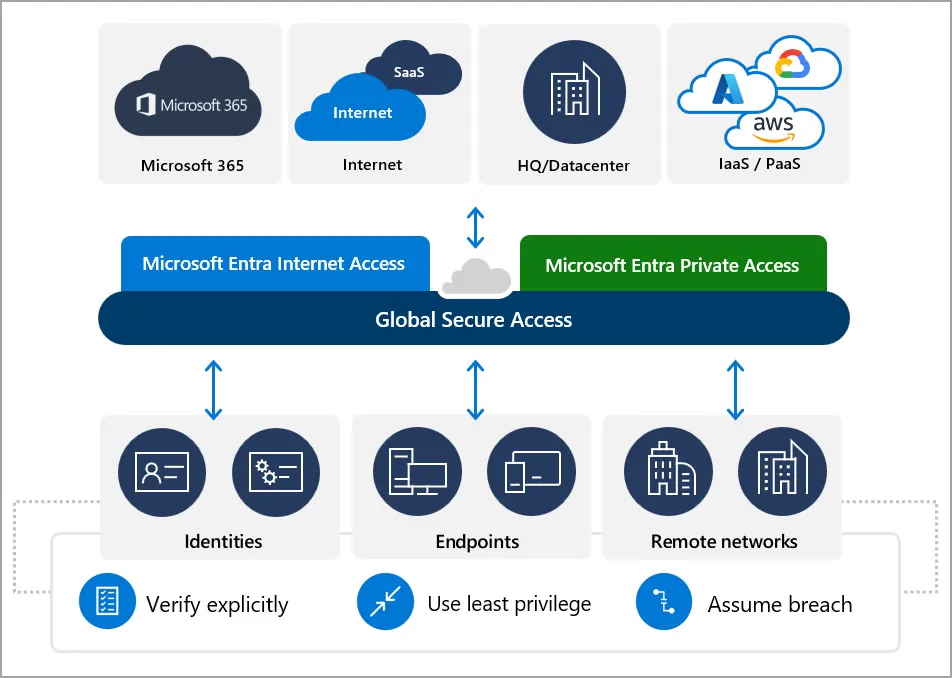
Zero Trust comes down to Microsoft's three principles: verify explicitly, use least-privilege access and assume breach. A VPN breaks all three: it trusts the network, grants broad access and does not limit damage. ZTNA applies all three on every connection.
In the Microsoft ecosystem, ZTNA is delivered by Microsoft Entra Private Access, part of Global Secure Access. It uses the same Entra ID Conditional Access policies you already use for Microsoft 365, Intune device compliance and Entra ID Protection identity risk. The rule that requires MFA and a managed device to open Teams also applies to your on-premises ERP or a file server.
How to migrate without switching off the VPN overnight
- Inventory: which private apps are used, by whom and from where.
- Quick access: first, replicate VPN access with Private Access so nobody loses anything.
- Segmentation: then publish each app separately and apply policies per group.
- VPN retirement: once all traffic goes through ZTNA, the concentrator is switched off.
At FCTECH we deploy Global Secure Access as part of our Microsoft security consulting, with the Entra license you already have or the one that fits you.