


Four scores, not one magic number
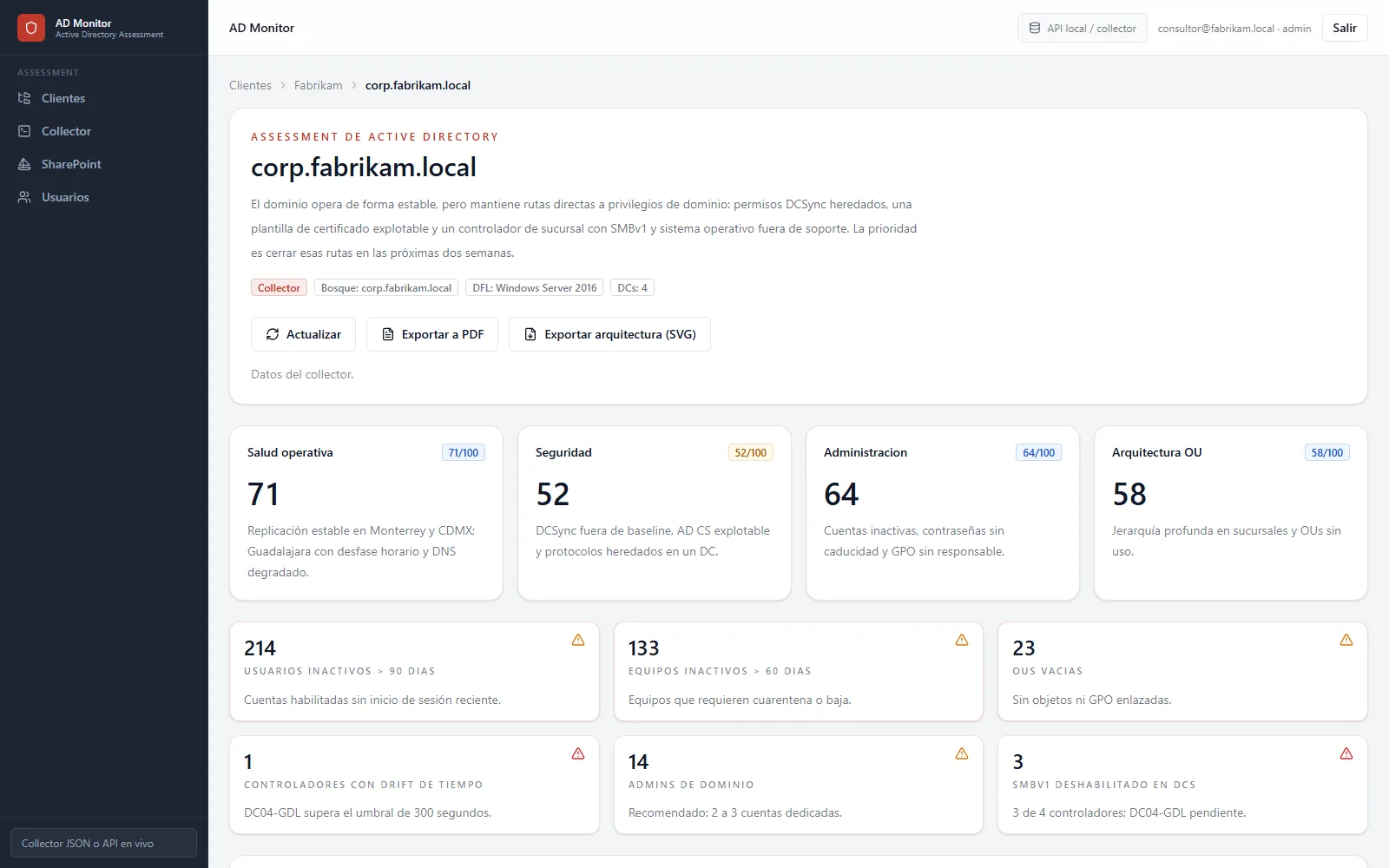
Security, operational health, administration and OU architecture, from 0 to 100. Every deducted point carries the rule and the evidence behind it.


 SearchPilotPurview investigations without the Purview portal.
 Deploy MonitorYour M365 security baseline in one week.
 Cloud MonitorAll of your Microsoft 365 in a single view.
 Migration MonitorMigrate to Microsoft 365 or Google Workspace.
 AD MonitorActive Directory assessment with evidence and a plan.
 Microsoft PartnerLicensing, Azure and consulting in one place.
 LicensingBusiness, Enterprise (E) and Frontline (F) plans.
 SecurityEntra, Defender, Purview, Sentinel and Intune.
 CollaborationTeams, Teams Phone, rooms, SharePoint and Viva.
 Artificial intelligenceMicrosoft 365 Copilot, agents and Foundry.
 AzureMigration, landing zones, backup and costs.
 Migrations to Microsoft 365With Migration Monitor, from Google, SharePoint or another tenant.
 Google WorkspaceGoogle licensing, security and consulting.
 LicensingBusiness, Enterprise and Frontline with Gemini.
 SecurityVault, DLP, context-aware access and devices.
 Gemini and AIGemini in the apps, Gemini Notebook and agents.
 Migration and consultingMigrations with Migration Monitor and Gemini adoption.
 ConsultingMicrosoft and Google assessments and implementations.
 AssessmentsM365 and Azure security, Purview and Copilot.
 Microsoft 365 securityEntra, Intune, Defender, Purview and Sentinel.
Azure implementationsIaaS, PaaS, SaaS and governance.
Google implementationsWorkspace, security, Gemini and migration.
Microsoft 365 securityEntra, Intune, Defender, Purview and Sentinel.
Azure implementationsIaaS, PaaS, SaaS and governance.
Google implementationsWorkspace, security, Gemini and migration.
 Managed servicesDevices, licensing, networking and collaboration.
AD Monitor
Managed servicesDevices, licensing, networking and collaboration.
AD Monitor
More than 50 security, health, GPO and OU controls, with every finding explained and a 90-day plan.
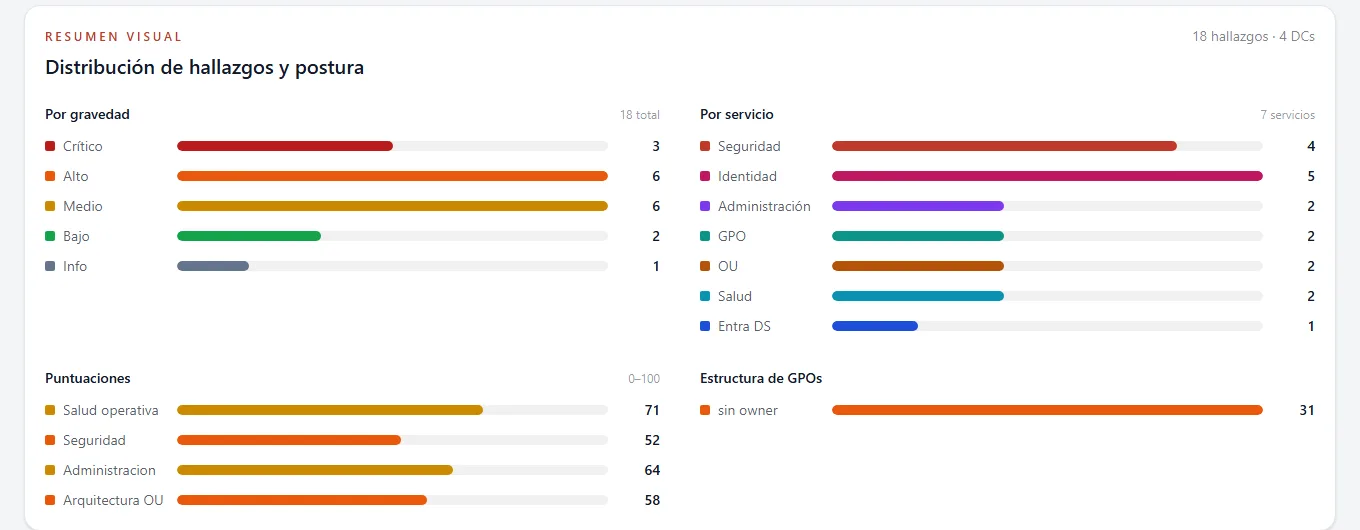
Security, operational health, administration and OU architecture, from 0 to 100. Every deducted point carries the rule and the evidence behind it.

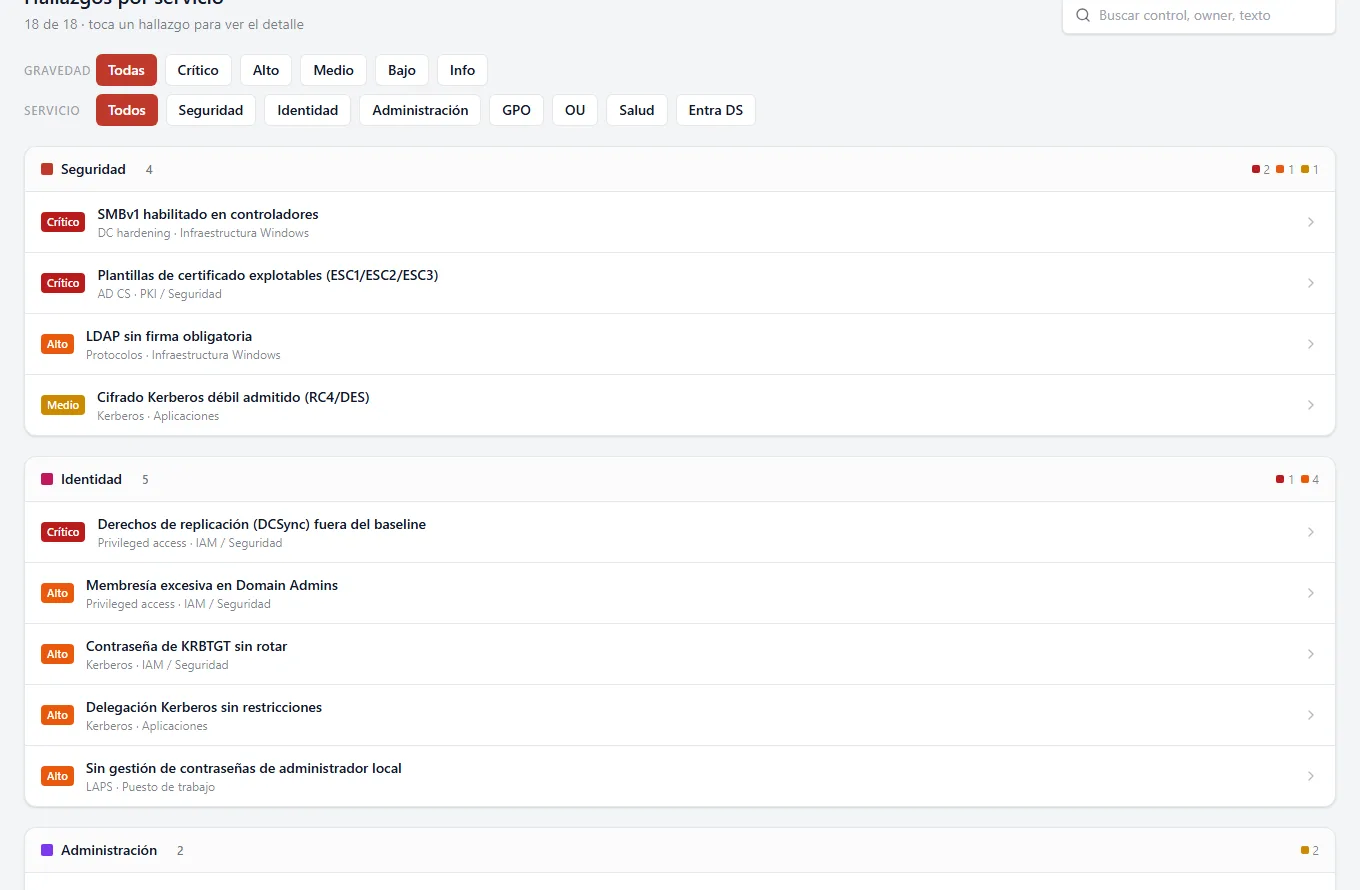
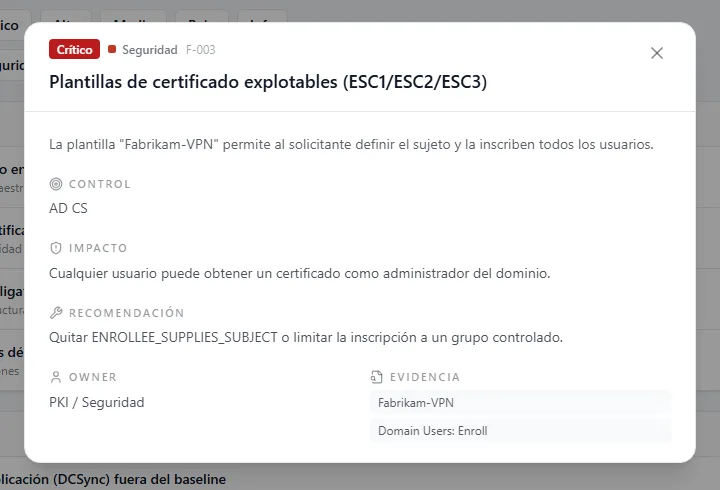
Control, impact, recommendation, owner and the exact domain controller data that proves it.

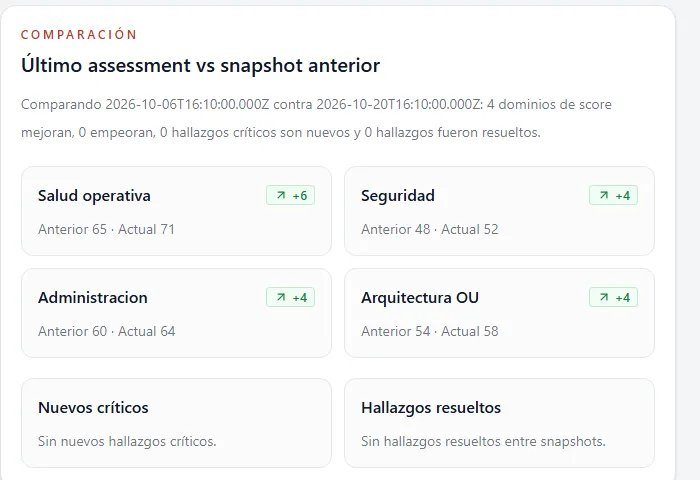
Every assessment is kept. Compare with the previous one and see what was fixed and what is new.

Security, identity, administration, GPO, OU and health. Filter by severity or search by control or owner.

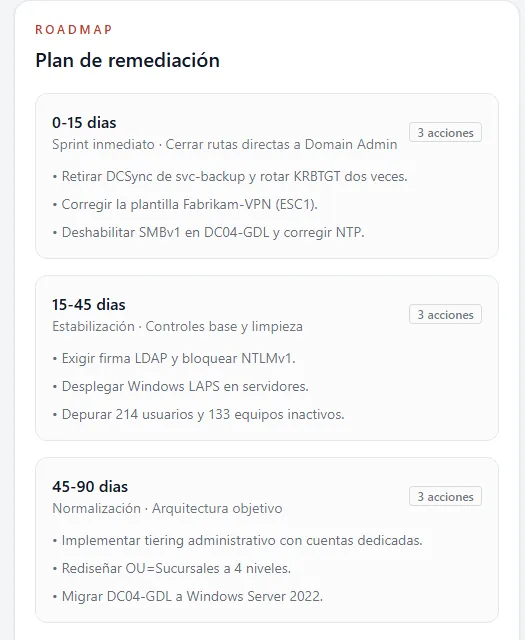
Actions in three stages: 0 to 15 days for direct risk, 15 to 45 to stabilize and 45 to 90 for the target architecture.

Export the report to PDF and the domain architecture to SVG to open it in Visio.
A PowerShell script. No agents, services or binaries installed on the domain controller.
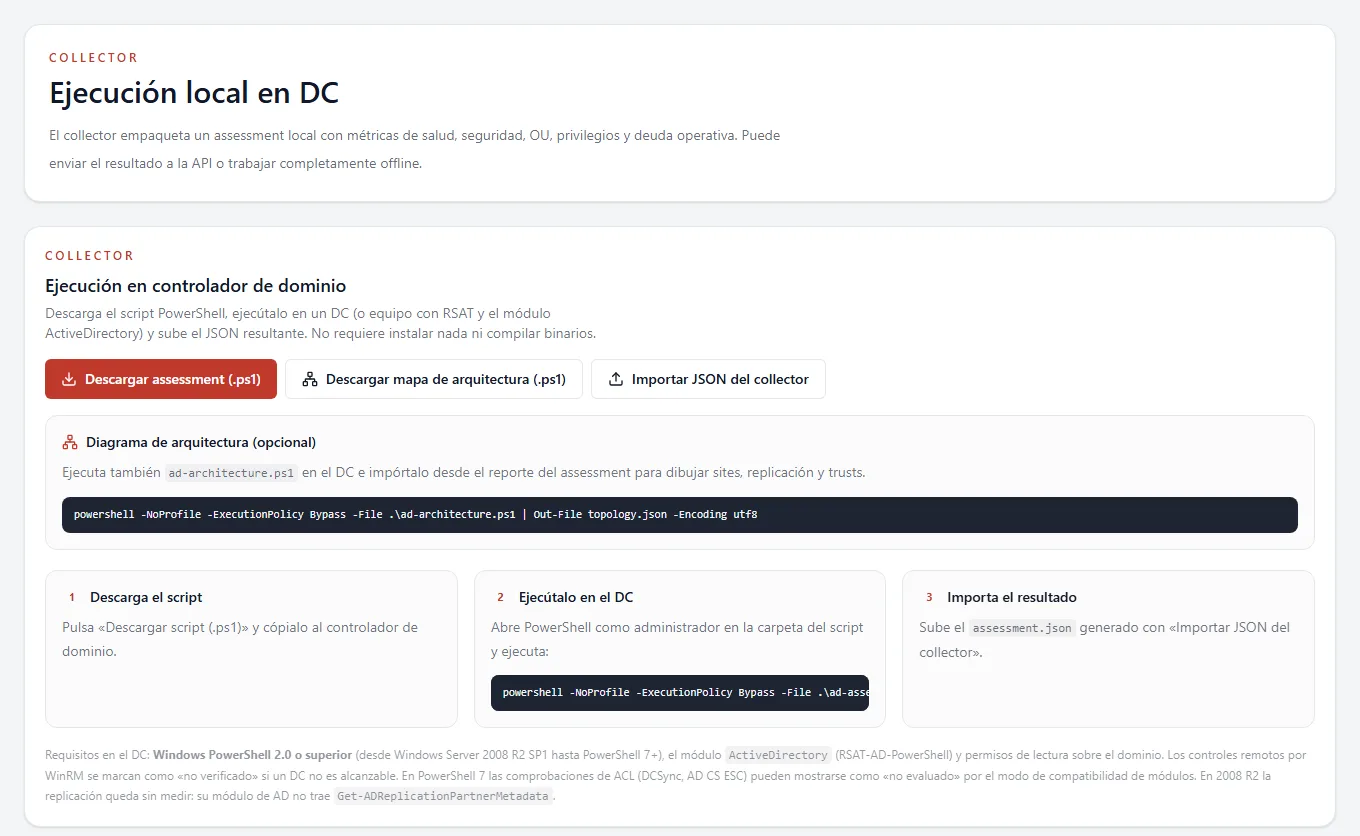
With read permissions on the domain. Works from Windows Server 2008 R2 to current versions.
The JSON file is loaded into the portal by client, forest and domain. It can also be sent straight to the API.
Findings with evidence, a remediation plan, a PDF for leadership and the architecture in Visio.
Separate clients, forests and domains, with users and roles per client.
A phased plan to move the domain to Microsoft Entra Domain Services.
Farms, sites and permissions ready to plan the migration with Migration Monitor.
No. The script only reads: domain configuration, domain controllers, GPOs and accounts. Changes come later, with the remediation plan.
Read access to the domain and the ActiveDirectory PowerShell module (RSAT). It runs on a domain controller or a machine with RSAT.
Yes. The script produces a JSON file that is imported into the portal later; the DC needs no internet access.
From Windows Server 2008 R2 SP1 with PowerShell 2.0 to current versions. On older versions some checks are marked as not evaluated instead of being guessed.
Yes. It is the tool we use for Active Directory assessments in our consulting projects.
We show you a full assessment with sample data and then run it on your domain.